Key takeaways:
- italki Classroom is the built‑in video tool on italki where learners and tutors meet for lessons.
- Features include screen sharing, file sharing, lesson recording, and private note-taking for both students and teachers
- You can start your lesson directly from your student dashboard, no software to download.
- Available on web browsers and mobile app, working seamlessly with teachers across 150+ languages
The italki Classroom is where thousands of learners around the world practice languages with real tutors. Whether you want to learn Spanish, English, Japanese, or another language, the Classroom makes lessons simple and accessible.
With over 10 million learners and 30,000+ teachers on italki, you can connect with a tutor who fits your goals and schedule. This guide shows you how the Classroom works, how to start your first lesson, and how to make the most of your time with your teacher.
You’ll also find tips for using the italki app or web platform, choosing your tutor from the Teacher Search page, and practicing effectively between lessons.
Prefer to jump straight in? Start learning on italki with Spanish tutors, Japanese tutors, French tutors, English tutors, and many more.
Want to learn a language at italki?
Find your tutor today!
What is italki classroom?
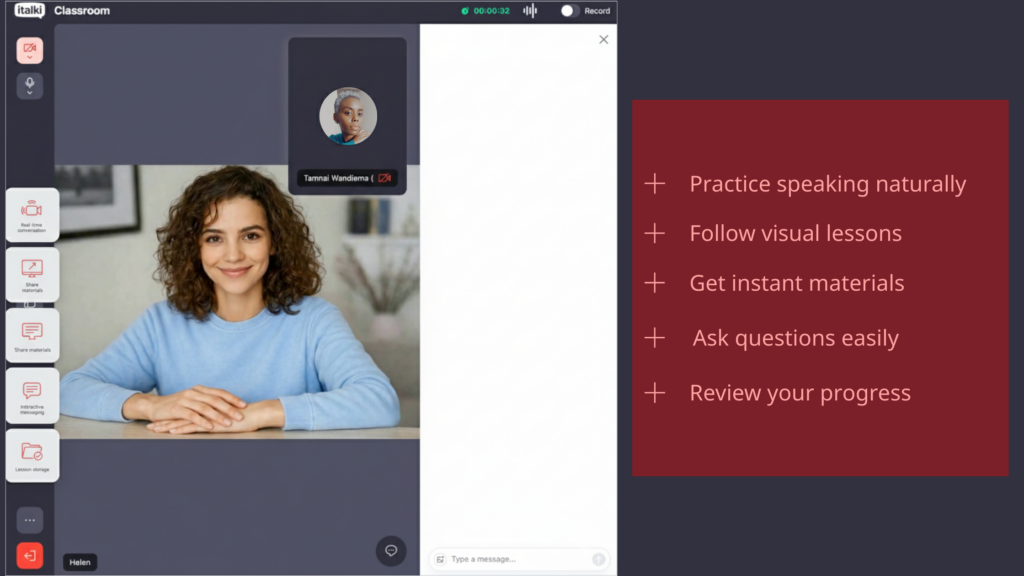
The italki Classroom is italki’s built-in video learning space where students and tutors meet for lessons. Unlike Zoom or Skype, the Classroom stays inside the platform, keeping your lesson materials, chat, and feedback all in one place.
Key features include:
- Live video and audio- Speak directly with your teacher in real time.
- Screen sharing- Teachers can show slides, PDFs, or online exercises.
- Built-in chat- Exchange links, notes, or vocabulary during the lesson.
- Lesson recording- After class, your notes, corrections, and homework remain linked to your profile.
- Private note-taking – Jot down new words or phrases during class, saved automatically to your account
Most tutors offer a choice between the Classroom, Zoom, or other video platforms. You can pick the one that works best for your device or learning style when you book your lesson.
Pro tip: Test your microphone and camera before your first lesson using the classroom’s built-in diagnostic tools. This prevents technical delays that can reduce your valuable practice time with native speakers.
New to the platform? Learn what is italki and how it connects you with qualified teachers.
How to use italki Classroom
Using the Classroom is simple and doesn’t require technical expertise. Here’s how:
1- Sign up / Log in – Create your italki account via email, Google, or Apple. If you already have an account, simply log in to access thousands of tutors.
2- Search for tutors – Use the Teacher Search page to find various English teachers, Spanish teachers, or teachers for any language you want to practice. Filter by price, availability, and teaching style to find someone who matches your needs.
3- Book your first lesson – Choose a teacher, select a date and time, and pick italki Classroom as your video platform. Many tutors offer promotions or discounted trial lessons, so you may find helpful deals for your first class.
4- Check your device – Make sure your microphone, camera, and internet connection are working properly.
5- Join the lesson – At the scheduled time, click Enter Classroom from your dashboard or lesson reminder. Your tutor will be waiting, and you can start learning right away.
Pro tip: If your lesson includes presentations, shared exercises, or group activities, ask your tutor ahead of time whether Classroom or Zoom is better for your needs.

From Hello to Fluent
Your next language adventure is one click away. Sign up for free and connect with a native tutor who makes learning fun and personalized!
Sign up free
How does italki Classroom work?
The Classroom connects your device to your tutor’s through a secure live video link on the italki app or web platform. Here’s what happens during your lesson:
- Video & audio connection –You see and hear your tutor in real time.
- Screen sharing & materials – Tutors can present PDFs, slides, or websites while you follow along, making grammar explanations and vocabulary lessons more visual.
- Interactive chat – You can type questions, links, or vocabulary during the lesson.
- Lesson storage – Notes, homework, and teacher feedback remain accessible from your account.
The Classroom works seamlessly across desktop and mobile devices, so you can learn anywhere. It’s designed to be intuitive for students of all levels; from CEFR A1 beginners to C2 advanced learners.
Ready to try your first lesson? Book a trial lesson with native speakers today
Looking to find a tutor in a location near you?
Connect with a tutor from these popular timezones.
What happens in your first 5 minutes?
Once you enter the Classroom, you’ll see a welcome screen where you can test your camera and audio. Your teacher joins at the scheduled time, and most tutors start by introducing themselves and asking about your learning goals.
This helps them understand whether you want to focus on conversation practice, exam preparation, or specific grammar topics.
The connection happens automatically, no friend requests or contact exchanges needed. Your lesson materials, chat history, and teacher feedback all stay linked to your profile, so you can review them anytime after class.
Find classes with tutors who speak your language
Learning becomes easier when your tutor understands where you’re starting from. italki connects you with teachers who specialize in teaching your target language to speakers of your native language:
- English classes for Spanish speakers – Your tutor speaks Spanish and can explain English grammar in Spanish when needed
- English classes for Chinese speakers – Your tutor speaks Chinese and can clarify English concepts in your language
- English lessons for Korean speakers – Tutors experienced with Korean learners’ specific needs
- French classes for English speakers – Your tutor speaks English and can explain French grammar clearly in English
- Japanese classes for English speakers – Your tutor speaks English and can break down Japanese concepts in your language
- Spanish lessons for English speakers – Your tutor speaks English and can explain Spanish grammar rules in English
This means less confusion and faster progress during your Classroom sessions.
Learning a language is easier when you have a teacher guiding you in real time. With the italki Classroom, you can practice speaking, listening, and writing directly with your tutor, track your progress, and access lesson materials anytime, all without juggling multiple apps or complicated setups.
Want to know more about the platform? Read our detailed italki review covering pricing breakdowns, teacher quality, pros and cons, and real student experiences to help you decide if italki is right for your learning goals.
Become fluent in any language with personal guidance from 30,000+ expert tutors trusted by over 10 million learners worldwide. Find a tutor who matches your schedule and learning style, book your first lesson and start speaking confidently.
Find Your Perfect Teacher
Get personalized lessons from native tutors who’ll help you speak naturally, not just correctly.
Book a trial lesson
FAQ
How much do italki classes cost?
Classes start from $4, depending on the tutor’s experience and lesson format. Community tutors (native speakers focused on conversation) sit at the lower end, while certified professional teachers charge more for structured lessons. For a full breakdown, see our guide to italki price.
What is better, italki Classroom or Zoom?
Both work well for online lessons. The Classroom is convenient because it keeps your lessons, chat, and materials in one place without requiring downloads on desktop. Zoom may be preferred if you’re already familiar with it or need specific features. Most tutors let you choose your preferred platform when booking.
Is italki Classroom good?
Yes. The Classroom is reliable for 1-on-1 practice with features like screen sharing, lesson recording, and automatic note-saving. Some learners prefer Zoom for specific features, but Classroom is ideal for seamless practice with real teachers.
Can I access it on mobile?
Yes, the italki app supports Classroom on iOS and Android. You can download the app or use the web version from any browser.
How do I download the italki classroom communication tool?
You don’t need to download italki Classroom on desktop, it works directly in your web browser when you click “Enter Classroom” on your lesson page. On mobile, download the italki app from the App Store or Google Play, and the Classroom is already built in.
Want to learn a language at italki?
Here are the best resources for you!